
Jumat, 24 September 2010
ZoomBoox.com | File Share Search Engines
Sabtu, 19 Januari 2008
Widget Installer Generator for Blogger (V1.00 - Beta) by O'om
"Tool baru buatan oom, tool ini berguna untuk mempermudah membuat proses
widget installer pada blogger"
 Pasti rekan sahabat sudah mengetahui button installer untuk blogger dimana button ini jika diklik
akan melakukan installasi otomatis ke blogger,
Saya yakin sebagian blogger sudah bisa membuat installasi ini,
namun bagaimana jika belum pernah berkenalan sama sekali dengan coding HTML atau
javascript? pasti akan bingung cara buat coding intallasinya. Nah untuk itu tool
"Widget Installer Generator for Blogger v1.00 - beta" saya ciptakan (saya buat).
Software ini bisa dikatakan sederhana namun manfaat dan kemudahan yang didapat
akan melebihi kesederhanaan tool ini. Agar mudah mempelajari tool ini saya buat
se User Friendly mungkin. Please... jangan kritik mengenai tampilan
ya..harap maklum tools ini saya buat dalam waktu singkat jadi terlihat
asal jadi :)
Pasti rekan sahabat sudah mengetahui button installer untuk blogger dimana button ini jika diklik
akan melakukan installasi otomatis ke blogger,
Saya yakin sebagian blogger sudah bisa membuat installasi ini,
namun bagaimana jika belum pernah berkenalan sama sekali dengan coding HTML atau
javascript? pasti akan bingung cara buat coding intallasinya. Nah untuk itu tool
"Widget Installer Generator for Blogger v1.00 - beta" saya ciptakan (saya buat).
Software ini bisa dikatakan sederhana namun manfaat dan kemudahan yang didapat
akan melebihi kesederhanaan tool ini. Agar mudah mempelajari tool ini saya buat
se User Friendly mungkin. Please... jangan kritik mengenai tampilan
ya..harap maklum tools ini saya buat dalam waktu singkat jadi terlihat
asal jadi :)
Apa saja kemudahan dalam tool ini :
1. Tanpa proses installasi yang rumit, hanya dengan melakukan ekstract dengan
program unzip (winzip atau winrar) tool nya langsung bisa dijalankan.
2. Karena file nya terhitung kecil hanya 1,1 MB (sudah termasuk VB6 runtime)
jadi bisa dibawa kemana saja dengan flash disc (apalagi yang main diwarnet).
3. Kemudahan yang lain bisa dicoba sendiri ya..saya bilang mudah karena saya
yang buat hehehe, namun belum tentu kalian juga bilang mudah but di coba aja
dulu.
4. Karena baru versi beta alias baru uji coba tentu masih banyak kekurangan,
jadi saya perlu masukan yang banyak dari teman semua.
5. Tools ini bisa digunakan secara offline, alangkah baiknya jika digunakan
ketika sedang online mengingat proses uji cobanya langsung ke blogger.
Cara Penggunaan Program:
Agar mudah saya jelaskan dengan gambar aja ya :)

Gambar 1
Ini merupakan judul witget yang nantinya akan tampak sesudah proses instalasi.
Kamu bisa memasukan kalimat apa saja yang sekiranya sesuai (contoh: Oom widget).
oh iya judul ini juga dapat diubah pengguna lain ketika melakukan instalasi ke
blogger, jadi sifatnya tidak permanent.

Gambar 2
Ini merupakan text dalam button caption, kamu bisa masukan kalimat apa saya (misalnya
"install link otomatis keblogger")

Gambar 3
Url banner atau logo bisa kamu masukan sebagai logo indentitas pemilik installer
ketika pengguna lain melakukan installasi pada blognya, sebenarnya gak terlalu
berguna sih. tapi jika dirasa perlu kamu bisa memasangnya. yang harus diingat
kamu harus mengalamatkan ke url dimana gambar kamu disimpan secara online.

Gambar 4
Nah ini agak rumit sedikit..yang jelas kamu harus ngerti code html yang akan
dimasukan dalam paket installasi. tidak usah berpikir telalu jauh..cukup
Copy/Paste aja kodenya misalnya code link banner punya mu..beres khan :)
Sebenarnya disini letak utama tools ini..bagi kamu yang
udah ngerti code Html/Javascript kamu bisa memasukan code apa saja kedalam paket
kode installasi..bisa berupa link gambar, alamat code widget milikmu misalnya
"link banner" , "recent comment" , "recent post" , "Alamat RSS Feed " dan
lain-lain, kalo mau sekalian aja script google adsense punyamu kali aja ada yang
mau pasang di blognya :)
Gambar 5
Disini kamu dapat mengatur letak text dan button misalnya rata tengah , rata
kanan dan...kayanya ga usah jelasin ya, saya yakin kamu udah mengerti.
Gambar 6
Kamu dapat menambah text tambahan diatas button installasi, text ini akan
memberikan informasi kepada pengunjung mengenai apa yang akan mereka installasi.
Selain itu saya tambahkan beberapa standar pengaturan text Html agar lebih rapi,
disini saya sertakan juga pilihan pada text.

Gambar 7
Disini proses paket intallasi dibuat, jika sudah melakukan proses text input,
settings warna dan pengaturan yang lain kamu dapat menekan langsung tombol ini
untuk membuat widget installer.
Gambar 8
Bersihkan -> Hanya digunakan untuk meng clear semua text yang ada dalam semua
textbox dengan satu tombol.
Gambar 9
Sebelum kamu melakukan Copy/Paste coding installer pada blog ada baiknya kamu
melihat hasilnya terlebih dahulu jika ada kesalahan atau kurang sreg kamu bisa
memperbaikinya codenya.
Gambar 10
Sebelum dipasang pada blog sebaiknya kamu bisa mencoba dulu proses instalasi nya,
untuk mencoba proses instalasi saya menggunakan engine Internet Explorer. cara
mencobanya cukup mudah, cukup klik aja button installer yang dibuat, trus kamu
akan masuk kedalam proses login pada blogger.
Gambar 11
AKHIRNYA SELESAI...tinggal kamu Copy/Paste codenya pada blog mu.
Gambar 12
Jika kamu masih bingung cara menginput dan setting kamu dapat meng-klik tombol
ini..jika ingin membersihkan klik tombol bersihkan.
Contoh hasil :
Ini contoh dibuat dengan Installer generator
Ini contoh dibuat dengan Installer generator
Ini contoh dibuat dengan Installer generator
Cara download dan Installasi :
Sebenarnya tool ini berukuran
sangat kecil cuma 23 kb dalam format zip, karena dibuat dengan Visual basic 6.0
jadi kamu harus punya VB runtime untuk menjalankan software ini..gak usah dipikirin om sudah masukin dalam satu paket jadi tinggal download aja.
 install blogger.zip (1MB)
atau
Catatan : Tools ini jauh dari kesempurnaan..dan
mungkin ada kesalahan dalam koding jadi laporkan kepada saya jika menemukan
error ke oom.avaco[at]gmail[dot].com
Tools ini bebas kamu sebarluaskan
bersama artikelnya (Gratis)...Copy/paste aja sesuka kamu....asal jangan lupa
code sumbernya ya :). Thanks
- SELAMAT MENCOBA, HAPPY BLOGGING -
Minggu, 02 September 2007
Best 20 Visual Basic Tutorial
Dibawah ini merupakan 20 kumpulan situs visual basic terbaik yang bisa jadi acuan bagi yang ingin lebih mendalami visual basic.
A1VBCode
- VB Source Code Site: Provides hundreds free Visual Basic source
code snippets and applications in all categories. Submit your own
code and win monthly VB prizes.
VB Wire: A Visual Basic news source. This site provides Visual Basic news which is updated daily. The site also provides a weekly VB newsletter which is delivered to your inbox with all of the past weeks VB news.
AppDev Training: Developer Training for Visual Basic, ASP, XML, SQL Server, VBA, Microsoft Access, Visual InterDev, and FoxPro through CD’s, videos, classes and licensing.
ITtoolbox Portal for Visual Basic: Content, community, and service for Visual Basic professionals. Providing technical discussion, job postings, an integrated directory, news, and much more.
VB Chat: A place where you can go and chat live about Visual Basic with other Visual Basic programmers around the world.
Just VB Jobs: This is an excellent new job site. It contains a huge database of nothing but VB jobs. It also contains numerous other VB resources which you'll find very helpful.
VBShop - The Visual Basic Shop: Tools and tips for VB programmers. Optimization, documentation, add-ins.
Programmers Heaven - Where programmers go: The Internet's most complete source of free downloadable programming files, source codes, utilities, Visual Basic, C/C++, JAVA, and other tools for programmers and developers. All files and links are organized in an easy-to-find format.
Visual Basic Jobs: Another excellent VB job site which you can use to search through a huge list of Visual Basic jobs across the U.S.
ProgrammingTutorials.com: Excellent site offering programming tutorials in many categories.
VB Code: This very popular site contains many VB code samples and snippets which you can search through.
VB Web Directory: Contains a huge index of Visual Basic Resources. Contains links, books, VB forums, job bank, and much more.
CodeGuru: An information resource for Visual Basic programmers. Contains information on all aspects of Visual Basic.
VB Accelerator: An excellent general Visual Basic site providing up to date VB news, tips, and many source code samples.
Visual Basic Expert: This site is for serious VB developers, huge amounts of professional code for download, help forum, developer resources, book reviews, online training and more..
Developers Domain: This site contains free code downloads, message boards, links, and much more.
Visual Basic Bookmark: A comprehensive directory of programming resources and development information for Visual Basic programmers, Database developers & web designers.
CodeArchive.com- The Source Code Site: The largest amount of Visual Basic source code on the Internet. Other features include a chat room and message board. You can get 50 MB for your own web site on CodeArchive.com .
Planet Source Code: Contains thousands of lines of source code which you can copy and paste directly into your own applications. Some of the code is in downloadable zip files.
VB Web - The online guide to VB- Over 120 downloads, and Tutorials on Commands, Controls, Windows API, Subclassing, Debugging and more. We also have Links, a Free Newsletter and Book Reviews. Fully Searchable.
Dari semua yang terbaik diatas menurut saya yang paling terbaik adalah planet-source-code.com
Sumber:http://www.visualbasicbooks.com
Kamis, 30 Agustus 2007
How to Shell out to default web browser
Kita dapat Memanggil default browser kemudian menjalankan Url yang
kita inginkan.
Cara menjalankan code:
'Paste code ini pada Module
Declare Function ShellExecute Lib "shell32.dll" Alias "ShellExecuteA" (ByVal
hwnd As Long, ByVal lpOperation As String, ByVal lpFile As String, ByVal
lpParameters As String, ByVal lpDirectory As String, ByVal nShowCmd As Long) As
Long
Public Const conSwNormal = 1
'Paste code ini pada CommanButton
ShellExecute hwnd, "open", "http://oom-vb.blogspot.com", vbNullString,
vbNullString, conSwNormal
Mengubah ukuran tampilan form (Sizable toolwindow) menggunakan SetWindowLong API function
'Paste kode ini pada Modul
Declare Function GetWindowLong Lib "user32" Alias "GetWindowLongA" (ByVal hwnd
As Long, ByVal nIndex As Long) As Long
Declare Function SetWindowLong Lib "user32" Alias "SetWindowLongA" (ByVal hwnd
As Long, ByVal nIndex As Long, ByVal dwNewLong As Long) As Long
Public Const WS_EX_TOOLWINDOW = &H80&
Public Const GWL_EXSTYLE = (-20)
Declare Function SetWindowPos Lib "user32" (ByVal hwnd As Long, ByVal
hWndInsertAfter As Long, ByVal x As Long, ByVal y As Long, ByVal cx As Long,
ByVal cy As Long, ByVal wFlags As Long) As Long
Public Const SWP_FRAMECHANGED = &H20
Public Const SWP_NOMOVE = &H2
Public Const SWP_NOZORDER = &H4
Public Const SWP_NOSIZE = &H1
'Paste code ini pada form code
Private Sub Form_Load()
Dim xx As Long
xx = GetWindowLong(hwnd, GWL_EXSTYLE)
xx = SetWindowLong(hwnd, GWL_EXSTYLE, _
xx Or WS_EX_TOOLWINDOW)
SetWindowPos hwnd, 0, 0, 0, 0, 0, _
SWP_FRAMECHANGED Or SWP_NOMOVE Or _
SWP_NOZORDER Or SWP_NOSIZE
End Sub
Menjalankan form selalu berada paling depan "alwasy on top"
Ada kalanya kita ingin menampilkan form kita selalu berada paling depan, untuk
mempermudah hal tersebut om akan memberikan solusinya
Deklarasi
Declare Function SetWindowPos& Lib "user32" (ByVal hwnd As Long, ByVal
hWndInsertAfter As Long, ByVal x As Long, ByVal y As Long, ByVal cx As Long,
ByVal cy As Long, ByVal wFlags As Long)
Code yang digunakan
'Code ini akan menampilkan form selalu didepan
rtn = SetWindowPos(OnTop.hwnd, -2, 0, 0, 0, 0, 3)
'Code ini untuk mengembalikan fungsi diatas
rtn = SetWindowPos(OnTop.hwnd, -1, 0, 0, 0, 0, 3)
Cara Menjalankan : Copy code di bawah pada form code)
Declare Function SetWindowPos& Lib "user32" (ByVal hwnd As Long, ByVal
hWndInsertAfter As Long, ByVal x As Long, ByVal y As Long, ByVal cx As Long,
ByVal cy As Long, ByVal wFlags As Long)
Private Sub Form_Load()
this code makes the window stay on top
rtn = SetWindowPos(OnTop.hwnd, -2, 0, 0, 0, 0, 3)
End Sub
Tag: Always on top Baca selanjutnya.. »
Rabu, 29 Agustus 2007
Disable the close X in a form's upper right corner
Code berikut ini digunakan untuk mendisable Close X pada form
Cara penggunaan : Copy paste code ini ke form code kemudian jalankan, terlihat
bahwa close X nya sudah disable
Pemenang kontes programming Visual Basic 6.0 source code (www.planet-source-code.com)
Tampilan Program:
User yang telah mengakses code ini sampai sekarang sebanyak 16,154 orang dari
seluruh dunia.
Download :
http://planet-source-code.com/vb/scripts/ShowCode.asp?txtCodeId=38980&lngWId=1

Program ini saya beri nama Avaco Uninstaller 2002 - [Updated : New ! English
Version]
Untuk memudahkan saya beri tanya jawab sedikit ya..
Q : Om Program apa ini?
A : Ini adalah program yang sangat complete untuk melakukan uninstaller windows
atau add/remove.
Q : Apa saja yang dilakukan program ini?
A : Dengan program ini anda dapat :
- Mengedit Entry pada Uninstall Registry.
- Menghapus Entry pada Uninstall Register.
- Membuat Entry baru pada Unintall Registry.
- Menyimpan dan mencetak laporan mengenai informasi
installasi program.
- Membuat Backup registry (export dan import registry).
- Melihat informasi mengenai program secara detail.
- Melihat Lokasi kelompok program (Programs Group) yang
terdapat dalam direktori Windows.
- Mengedit entry registry uninstall langsung dari regedit
- dan masih banyak lagi....Terima kasih
Q : Sudah berapa banyak orang yang mendownload source code ini:
A : Kalo tidak salah sampai sekarang kurang lebih 16.149 ribu orang
Q : Dimana saya bisa mendownload source codenya?
A : Klik
http://planet-source-code.com/vb/scripts/ShowCode.asp?txtCodeId=38980&lngWId=1
Q : Bolehkah saya mengedit source code program ini?
A : Sangat boleh, tapi jangan lupa memberikan credit inisial saya diprogram yang
telah dibuat.
Q : Bolehkah saya menjual program ini?
A : tentu saja tidak boleh, karna program ini sudak mempunyai hak paten
(The author may have retained certain copyrights to this code...please observe
their request and the law by reviewing all copyright conditions at the above
URL.)
Q : Kemana saya ingin bertanya mengenai source codenya?
A : ke email aja ya ar.avaco@gmail.com
Q : Thanks om.
A : Sama-sama :)

Oom - Keyboard Diagnostic 2002 (VB6 - Open Source)
Ini juga salah satu tool buatan o'om.
this is program for check or find error on keyboard and another you can look keyboard information. very easy :) this program like Norton Diagnostic for keyboard. thanks.
Download Source code : http://planet-source-code.com/vb/scripts/ShowCode.asp?txtCodeId=39441&lngWId=1
Tampilan :

User yang telah mengakses code ini sampai sekarang sebanyak 2307 orang dari seluruh dunia.
Baca selanjutnya.. »Oom - Access Siemens GSM CellPhone With Full AT+Command (VB6 - Open Source)
Salah satu tool buatan o'om.
This is a full AT+Command for access siemens GSM CellPhone.
This program only to know with handy test AT+Command for Siemens. With this
program you can know how to access siemens with AT+Command. For example :
AT+CGMI = output [SIEMENS], AT+CGMM = output [C45], Access Midi (sound) = AT^SBNW="mid",0,1
> 4D5468640000000..... (CTRL-Z) , Access Logo = example : AT^SBNW="bmp",0,0 and
any other.
Download Source code : http://planet-source-code.com/vb/scripts/ShowCode.asp?txtCodeId=39444&lngWId=1
Tampilan :

User yang telah mengakses code ini sampai sekarang sebanyak 4730 orang dari seluruh dunia.
Baca selanjutnya.. »Oom - How to know speed form access (VB6)
You can look your speed form access With simulation. This is very useful If you want To know access "speed" you form . Very Simple and easy.
'**************************************
' Name: How to knowspeed form access
' Description:This code just to know "speed" form access.
' By: oom
' Paste This code in the module don't in form_Load
' Change Start object as sub main
' For check speed form :
' run the form for the first time and look how many
' you get access on speed form.
' Step two load picture or large picture in form and
' then check again how many form speed is u get.
'**************************************
Private Declare Function GetTickCount Lib "kernel32" () As Long
Sub main()
Dim lSpeedTime As Long
Dim SInfoSpeed As String
lSpeedTime = GetTickCount
Load Form1
Form1.Show
lSpeedTime = GetTickCount - lSpeedTime
' this is only simulation
If lSpeedTime <= 50 Then
SInfoSpeed = "[Very Fast]"
ElseIf lSpeedTime >= 50 And lSpeedTime <= 100 Then
SInfoSpeed = "[Normal]"
ElseIf lSpeedTime >= 100 And lSpeedTime <= 200 Then
SInfoSpeed = "[Slow]"
ElseIf lSpeedTime >= 200 Then
SInfoSpeed = "[Very Slow]"
End If
Form1.Caption = "Time Speed Form: " & lSpeedTime & " Milliseconds - " &
SInfoSpeed
End Sub
User yang telah mengakses code ini sampai sekarang sebanyak 972 orang dari seluruh dunia.
Baca selanjutnya.. »Percantik halaman blog programmer dengan "New Code Scrolling Ticker" dan "Textbox Search Source Code"
Jika anda mempunyai blog yang difokuskan pada dunia programming "New Code Scrolling Ticker" sangat cocok untuk mempercantik halaman blog programmer anda. "New Code Scrolling Ticker" merupakan informasi cepat mengenai posting source code terbaru yang beralamatkan pada www.planet-source-code.com. Selain menggunakan "New Code Scrolling Ticker" anda juga bisa mempercantik dengan menggunakan "Textbox Search Source Code", berbeda dengan Scrolling Ticker pada Textbox Search ini dikhusus kan melakukan proses pencarian langsung pada halaman yang dicari sesuai dengan categori yang dipilih.
Sampel dari "New Code Scrolling Ticker"
Lakukan Copy dan Paste kode dibawah ini kedalam HTML anda.
<IFRAME ID=IFrame1 FRAMEBORDER=0 SCROLLING=NO SRC="http://www.Planet-Source-Code.com/vb/linktous/ScrollingCode.asp?lngWId=2" height=160> Your browser does not support inline frames...However, you can click <A href="http://www.Planet-Source-Code.com/vb/linktous/ScrollingCode.asp?lngWId=2"> here</a> to see the related document. </IFRAME>
Untuk mempercantik dengan munggunakan box pencarian, anda bisa menggunakan code dibawah ini.
Sampel dari Textbox pencarian:
Lakukan Copy dan Paste kode dibawah ini kedalam HTML anda.
<form action="http://www.Planet-Source-Code.com/vb/scripts/BrowseCategoryOrSearchResults.asp" method="post" id=form2 name=form2> <p><font face="verdana,verdana,arial" size="2"> <IMG src="http://www.Planet-Source-Code.com/vb/images/psc_small.gif" width="153" height="55" align="left">Search Thousands of lines of free code at <a href="http://www.Planet-Source-Code.com"> www.Planet-Source-Code.com</a><br> </font><font face="Verdana,verdana,arial"> <font size="1" color="#000000"><br> </font><font size="2"><INPUT type="radio" value="1" name="lngWId" checked>Vb World <INPUT type="radio" value="2" name="lngWId">Java World <INPUT type=radio value=3 name=lngWId>C++ World <INPUT type=radio value=4 name=lngWId>ASP World<BR> </font><font size="1" color="#000000"> <input name="txtCriteria" size="12"> <input type="submit" value="Search" name="B1"><br> <b><a href="http://www.Planet-Source-Code.com/vb/scripts/search.asp"> Advanced Search</a> <a href="http://www.Planet-Source-Code.com/vb/scripts/BrowseAllCategories.asp"> Browse</a></b></font><input type=hidden name="txtMaxNumberOfEntriesPerPage" value="10"> </font> <input type=hidden name=blnResetAllVariables value=TRUE> </p> <font face="Verdana,verdana,arial"> <input type=hidden name="optSort" value="Alphabetical"></font> </form>
BEST BUY : 11 CD Full Source Code Untuk Programmer
Selama ini para programmer mungkin mengalami kesulitan dalam mencari source code (Visual Basic, Java/Javascript, C/C++, Active Server Pages, .NET, PHP, Delphi). Dari pada pusing dan menghabiskan waktu serta menguras keuangan, saya menyarankan lebih baik kalian membeli Planet Source Code Jumbo CD. Dengan harga CD yang tidak mahal saya yakin kalian tidak akan rugi. Coba pikir kembali waktu dan uang yang kalian keluarkan jika harus online ke internet?
Sedikit penjelasan Planet Source Code Jumbo CD adalah hampirsemua source code yang dikumpulkan ke dalam beberapa CD sesuaidengan categori pilihan. Saya ingatkan bahwa situs ini mempunyai baris code sebanyak 12,539,901. Kalian bisa bayangkan aja sendiri jika membeli semua CD nya hampir semua code ada dalam genggaman kalian.
Apakah ada cara mendapat CD Jumbo-nya secara gratis?
Ada, tapi dengan sedikit usaha yang lumayan keras. Caranya yaitu kalian harus memenangkan contest programming source code yang diadakan setiap bulan. System penilaian berdasarkan suara terbanyak dengan diberikannya tanda lima bintang 5 (*****) sebagai suara yang diakui dalam kontest. Saya yakin kalian para progammer pasti bisa, saya pribadi juga pernah menang (lihat disini) dan mendapatkan CD Jumbo sebagai hadiahnya.
Dibawah ini merupakan contoh tampilan program yang sudah di installasi yang ada dalam pake planet source code CD jumbo :

Tampilan utama dari program Pencarian
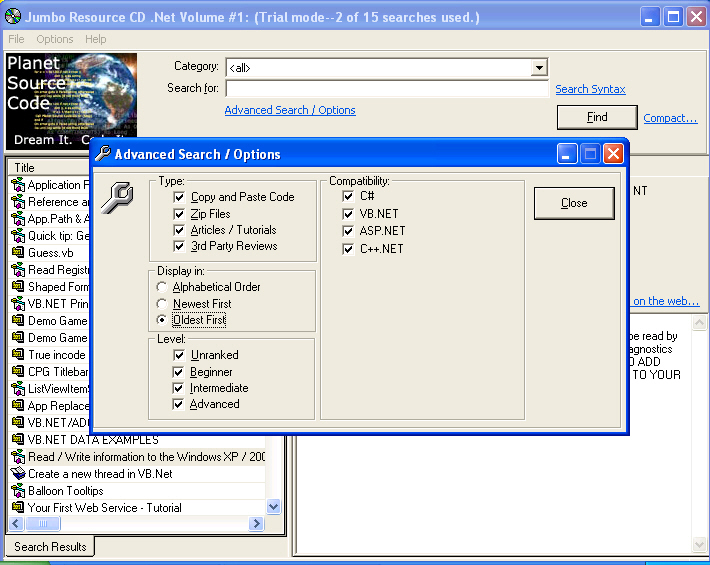
Tampilan Pilihan Pencarian
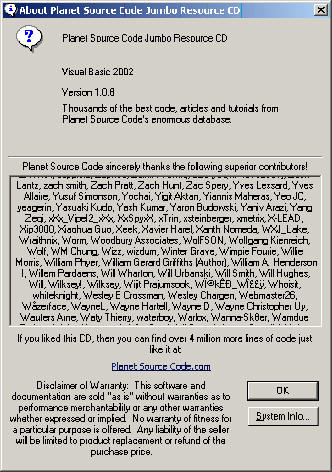
Tampilan About
Dibawah ini berupa keterangan harga dari CD sesuai dengan kategori pilihan:
Planet Source Code Jumbo Resource CD: Visual Basic 2002 Volume #1(formerly the
Visual Basic 2002 Edition)
All the best Visual Basic code on Planet Source Code from the start of the site
till 6/1/2002.
harga : $ 19.95*
Planet Source Code Jumbo Resource CD: Visual Basic Volume #2
All the best Visual Basic code on Planet Source Code from 6/2/2002 – 3/1/2004.
Harga : $ 17.95*
Planet Source Code Jumbo Resource CD: Visual Basic Volume #3
All the best Visual Basic code on Planet Source Code from 3/2/2004 – 5/2/2005.
Harga : $ 17.95*
Planet Source Code Jumbo Resource CD: Java/Javascript Volume #1
All the best Java and Javascript code on Planet Source Code from the site start
to 5/2/2005
Harga : $ 11.95*
Planet Source Code Jumbo Resource CD: C/C++ Volume #1 (formerly the C/C++ 2002
Edition)
All the best C and C++ code on Planet Source Code from the start of the site
till 6/1/2002.
Harga : $ 15.95*
Planet Source Code Jumbo Resource CD: C/C++ Volume #2
All the best C and C++ code on Planet Source Code from 6/2/2002 – 5/2/2005.
Harga : $ 11.95*
Planet Source Code Jumbo Resource CD: ASP Volume #1 (formerly the ASP 2002
Edition)
All the best Active Server Pages (ASP classic) code on Planet Source Code from
the start of the site till 6/1/2002.
Harga : $ 15.95*
Planet Source Code Jumbo Resource CD: ASP Volume #2
All the best Active Server Pages (ASP classic) code on Planet Source Code from
6/2/2002 – 5/2/2005.
Harga : $ 11.95*
Planet Source Code Jumbo Resource CD: Delphi Volume #1
All the best Delphi code on Planet Source Code from the site start to 5/2/2005.
Harga : $ 9.95*
Planet Source Code Jumbo Resource CD: PHP Volume #1
All the best PHP code on Planet Source Code from the site start to 5/2/2005.
Harga : $ 9.95*
Planet Source Code Jumbo Resource CD: .NET Volume #1
All the best .NET code on Planet Source Code from the site start to 5/2/2005.
Harga : $ 12.95*
Menurut saya jika dibandingkan dari harga CD dengan source code yang kalian dapatkan rasanya tidak sebanding :).
Jika berminat membeli Informasi lebih lanjut bisa kunjungi:
http://www.Planet-Source-Code.com
Atau
http://www.exhedra.com/exhedra/PlanetSourceCode/CD.aspx
Catatan : Informasi diatas tidak ada motif iklan sedikitpun saya hanya memberi informasi saja dan tidak mendapat keuntungan apa-apa :)
Langganan:
Postingan (Atom)


